


Attention Savvy Customer Service Representatives!
Expand your customer service reach with live chat using OnlineChatCenters.com
Support multiple Customers and/or Websites with OCC from a single agent interface.
For each customer that you will support, create an additional Department. Generate the HTML code for that particular department and place it on the customer’s site. When visitors request a chat, you will be their first point of contact for the chat. By using departments as customer accounts, you can support multiple clients using a single OCC Agent.
And that’s not all……! As a Premium Version Account Holder, you have several PER DEPARTMENT custom abilities. Logos, Banners, Agents, Footers, Invites, and much more!
Now with our latest feature for Premium Version Accounts, we have incorporated Live Real Time Translation to the Agent. For example: You are in Argentina and speak Spanish. A visitor from Germany visits your website. He can type to you in German and you will read that translated into Spanish. And you respond in Spanish, the visitor will read your response in German.
It’s amazing! Motava Corporation is the first to incorporate Live Real Time Translation ability within a Chat Agent application of its kind.
Join our community today and expand the use of Live Chat for websites today. The Premium Version upgrade is priced at only $29.95 PER YEAR so it’s affordable for any budget!
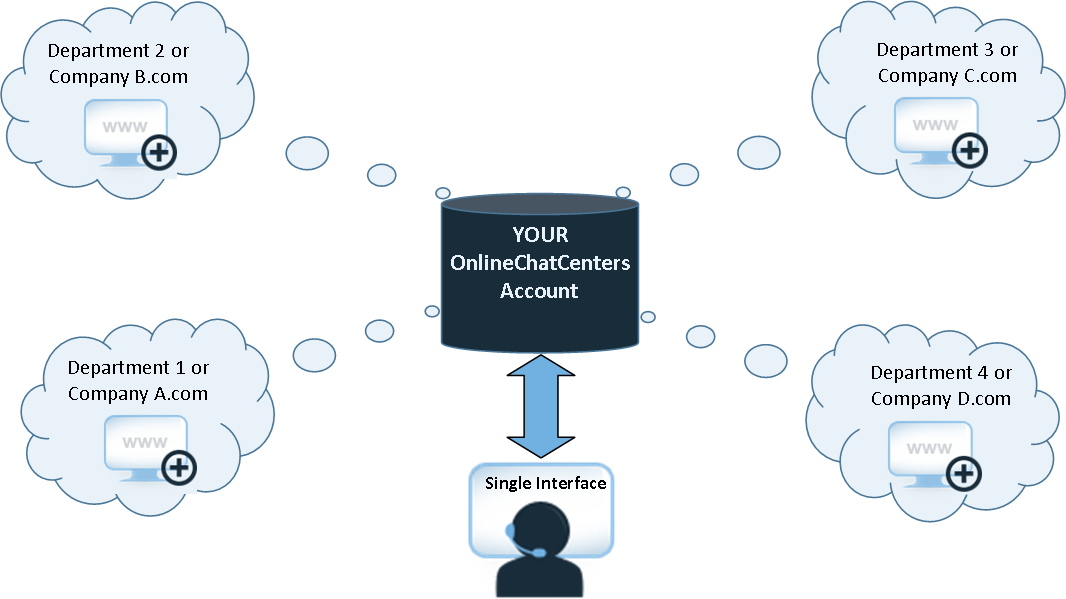
Support Multiple Websites/Companies/Departments from a Single Agent Interface.
