
2
Multiple Websites/Departments
Paid Add-on Feature
+
Use OCC to setup multiple support departments or monitor multiple websites through a single OCC account and its operators.
One free website/department is included with each OCC account.
Additional departments cost $19.95 per year for Premium Version accounts and $24.95 per year for Free Version accounts.
More >>
Multiple Websites/Departments
Use OCC to setup multiple support departments or monitor multiple websites through a single OCC account and its operators.
Once setup, the HTML code can be generated for individual departments to place on separate pages (eg - Sales Department can be placed only on a Pricing webpage) or can be generated for all departments.
Visitors requesting a chat can choose which department they wish to chat with.
One free website/department is included with each OCC account.
Additional departments cost $19.95 per year for Premium Version accounts and $24.95 per year for Free Version accounts.

4
Custom Chat Invitations
+
Send a live chat invitation to site visitors to begin a chat session using a custom or pre-defined message.
Custom Chat Invitations are accessible with Free and Premium versions.
More >>
Custom Chat Invitations
Send a live chat invitation to site visitors to begin a chat session using a custom or pre-defined message. Ask site visitors if there is anything you can help them with or if they have any questions about the webpage they are on.
The ability to initiate live chat with prospective customers can be strategically leveraged to convert casual inquiries into useful conversation.
This feature is manageable per department.
Custom Chat Invitations are accessible with Free and Premium versions.
6
Web-Based Agent Operator Interface
+
OCC Web Agent is an interface for operators to chat with visitors accessed through any web browser, requiring no additional software to be installed (Adobe Flash Required).
Web agent is accessible with Free and Premium versions.
More >>
Web Agent Operator Interface
OCC Web Agent is a web version of the OCC Agent Desktop Software which works on any computer where internet is available.
It is accessible via all major, updated web browsers including Internet Explorer, Firefox, Safari, and Chrome.
Web agent is accessible with Free and Premium versions.
.jpg)
8
Supervisor Monitoring and Interaction
Included in Premium Version
+
Assign Supervisor rights to operators, allowing that operator to monitor the chats of other operators as well as interact in the chat.
Supervisor Operator Feature is only available for Premium Version Accounts.
More >>
Supervisor Monitoring and Interaction
Assign Supervisor rights to operators, allowing that operator to monitor the chats of other operators as well as interact in the chat.
Supervisor mode is a great for training and higher level support.
Supervisor Operator Feature is only available for Premium Version Accounts.
10
Customizable Banners
Included in Premium Version
+
Remove banner advertisements and OCC branding from visitor chat window and can replace them with custom banner graphics to promote a particular web page or product.
Customizable Banners are only available for Premium Version Accounts.
More >>
Customizable Banners
Remove banner advertisements and OCC branding from visitor chat window and can replace them with custom banner graphics.
The top banner, left column banner and footer are all customizable through the administration section with a graphic file or custom HTML.
Multiple banners can be uploaded for each section and rotated at a custom-set interval.
In addition, all advertisements within the OCC Agents are removed and free reminder notifications are removed with a Premium Version subscription.
Customizable Banners are only available for Premium Version Accounts.
12
Canned Messages
+
Canned Messages are pre-defined frequently used messages that operators can select and send without typing the message.
Canned Messages are accessible with Free and Premium versions.
More >>
Canned Messages
Canned Messages are pre-defined frequently used messages that operators can select and send without typing the message.
The Canned Messages feature neatly organizes your canned messages within Categories and can be filtered per operator and per department.
Canned Messages are accessible with Free and Premium versions.
14
Chat Conferencing
+
This feature allows multiple operators to start a conference with each other or with a visitor.
To start a conference, you must have more than 1 operator enabled for your account.
Chat Conferencing is accessible with Free and Premium versions.
More >>
Chat Conferencing
This feature allows multiple operators to start a conference with each other or with a visitor.
To start a conference, you must have more than 1 operator enabled for your account.
Chat Conferencing is accessible with Free and Premium versions.
Knowledgebase
Each OnlineChatCenters account has a free Knowledgebase included.
Through the web administration panel, knowledgebase articles can be managed and categorized and customized per department.
Each article can be integrated onto a website or inserted into a visitor chat.
18
Chat Icon in Email Signature
+
From the OCC Agent, you can create an Email Signature that includes your live chat icon and your online/offline status to be imported into your favorite email client like Outlook or Thunderbird.
Email Signature is accessible with Free and Premium versions.
More >>
Email Signature
From the OCC Agent, you can create an Email Signature that includes your live chat icon and your online/offline status to be imported into your favorite email client like Outlook or Thunderbird.
If you have multiple departments, you can select just a single department for your signature or you can select them all.
If your email recipient clicks on your live chat icon in your email message, they will go directly to the live chat screen within their internet browser to begin their chat session
Email Signature is accessible with Free and Premium versions.
20
Operator-to-Operator Chats
+
If you have more than 1 operator enabled for your account, you also have the option for operator-to-operator chats.
Operator-to-Operator Chats is accessible with Free and Premium versions.
More >>
Operator-to-Operator Chats
If you have more than 1 operator enabled for your account, you also have the option for operator-to-operator chats.
To do this, just double click on any of the available operators in your list. From here you can conference in more operators for a group chat.
Operator-to-Operator Chats is accessible with Free and Premium versions
22
Online / Offline Icons
+
Select from our popular free online / offline icons provided in the admin section or upload your own custom icons. These will be the icons that show your online or offline status on your pages.
Upload your own Online/Offline is accessible with Free and Premium versions.
24
Advanced Reporting
Included in Premium Version
+
OnlineChatCenters provides reporting features for all of our customers accessible from your web-based administration panel.
More >>
Advanced Reporting
OnlineChatCenters provides reporting features for all of our customers accessible from your web-based administration panel.
The following reports are available:
-
Operator Statistics: Rating, Chats
-
Invite History
-
Visitor Surf Log - Premium Only
-
Chat History - Premium Only
-
Hot Page Ranking - Premium Only
-
Referral Links - Premium Only
Every report has the ability to be exported to a comma separated value (*.csv) file and emailed to you on a regular, scheduled basis.
Operator Statistics
This report shows you the chat statistics and ratings per operator. You can also schedule automated email reports.
Invite History
This report shows the history of timed chat invitations made through your site.
Visitor Surf Log - Premium Only
This report shows the pages each visitor views in the order they viewed it and the length of each page visit.
Chat History - Premium Only
View the chat logs your operators had with your site visitors.
Hot Pages - Premium Only
This report shows the most visited pages of your site(s).
Email Report Summary - Premium Only
Though not a report, this is your list of scheduled reports and the times when they will run. When the scheduled report is complete, it will then be emailed to the designated email address.
Referral Links - Premium Only
This report shows referring pages and how your visitors landed on your site.
26
Operator Rating
+
For every chat session that an operator is involved in, the visitor has the opportunity to rate how well they feel the operator performed. At the end of the Chat Session, a star rating is presented to the site visitor.
More >>
Operator Rating
For every chat session that an operator is involved in, the visitor has the opportunity to rate how well they feel the operator performed. At the end of the Chat Session, a star rating is presented to the site visitor.
They can rate the operator on a scale of 1-5 stars. This rating of the operator at the end of each chat can be disabled from the administration section. In addition, you can then pull up a report inside the administration section to view ratings for all operators.
28
On-Hold
Included in Premium Version
+
The on-hold feature allows operators to put a chat on hold with custom defined on-hold text and on-hold music/MP3 sent at regular intervals to the chat visitor.
On-Hold is only available for Premium Version Accounts.
More >>
On-Hold
The on-hold feature allows operators to put a chat on hold with custom defined on-hold text and on-hold music/MP3 sent at regular intervals to the chat visitor.
This feature is very convenient if you have a few open chats at the same time or just need to review the request at length.
You can set the on-hold intervals and assign different on-hold notifications per department.
You can also take advantage of the text and custom MP3 with an advertisement!
On-Hold is only available for Premium Version Accounts.
30
Technical Support via Chat & Email
Included in Premium Version
+
Technical support from our OCC support team via our live chat and email for offline situations is available to Premium Account holders only.
32
Missed Chat Requests
+
Missed chat requests allows reviewing of messages that were requested while offline with the ability to email using a pre-formatted reply and mark a message as processed.
Missed chat requests messages can also be emailed to the account administrator as they arrive.
34
Chat Forwarding
+
Chat forwarding allows you to forward an in-progress chat session to another available operator.
Chat Forwarding is accessible with Free and Premium versions.
More >>
Chat Forwarding
Chat forwarding allows you to forward an in-progress chat session to another available operator.
To forward a chat request, click on the Forward button during the chat session.
Chat Forwarding is accessible with Free and Premium versions.
36
Customizable Email Transcript Template
+
After a chat session ends, a chat transcript may be sent via email. The message’s template that the email is contained in can be customized using variables such as name and chat transcript.
38
Visitor Information & Geo-location
+
Each site visitor and chat request includes a Geo-location feature that provides accurate, in-depth information about the geographic characteristics of website visitors as well as native language, country/state, and the browser being used.
40
Customizable Sound Notifications
+
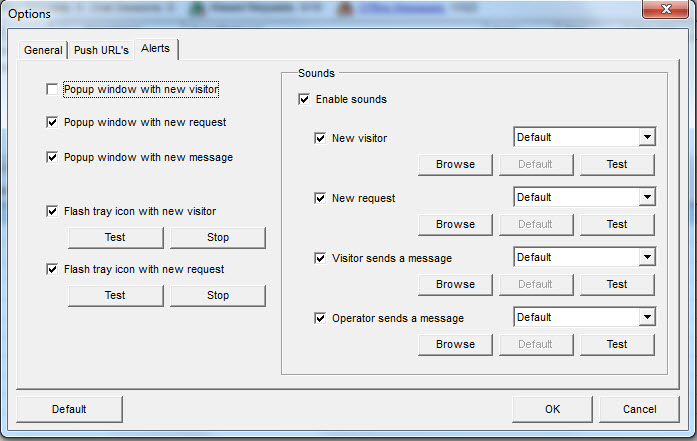
Customize the sounds OCC web and desktop agents will make when someone visits your website or requests a live chat. You can use the default OCC Agent sounds or upload your own sounds.
Customizable sound notifications are accessible with Free and Premium versions.
More >>
Customize Sound Notifications
Customize the sounds OCC web and desktop agents will make when someone visits your website or requests a chat. You can use the default OCC Agent sounds or use your own sounds.
Compatible sound files are: WAV, MP3 and WMA.
Customizable sound notifications are accessible with Free and Premium versions.