Follow us on our new OnlineChatCenters-only Twitter account:
@OCC
Our old twitter, @motava will be only for motava specific items now and everything OCC related will be located at the new account!


Follow us on our new OnlineChatCenters-only Twitter account:
Our old twitter, @motava will be only for motava specific items now and everything OCC related will be located at the new account!
The Department Selection Page feature is officially released in OnlineChatCenters. An embedded video can be found at the end of this post.
Watch Department Selection Page on The OCC YouTube Channel
The new section can be found in your OCC Administration Section under Setup –> Settings –> Design Customization –> Department Selection Page
There are 4 options for your department selection page, 3 pre-set themes and an option to customize your page.
The 3 themes are:
Classic Boxes – This is the style that has been used for the department selection page up to now
Graphic & Text Links – This is a new style that displays the department logo with the department name
Text Links – This is a new style that displays just the department name and online/offline status

Department Selection Page Themes
The Graphic & Text Links and the Text Links themes’ department name text can be customized through the font styling options that appear when you click on one of the options:
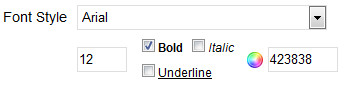
Font Styling for the Dept. Select Page
Below you’ll find a video explaining and demonstrating the features in more detail:
[youtube dDXjOb6uMS4]
Today we’ve released a newer, different version of our HTML code. The new code should improve the speed of sites that use OCC and will make your site much more stable in the case we have server downtime.
Using the new code on existing websites is not required or mandatory but it is recommended. The old HTML code will still work.
Find the new code in your OCC account administration section under Setup -> Generate HTML:
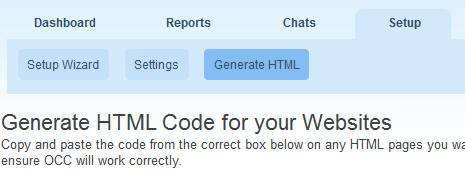
Generate HTML section - New Code
The Mac OCC Agent Beta version 1.7 is now released and available for download.
You can download the latest version, version 1.7 here:
Download OCC Agent for Mac
In this latest version we added:
# Live Spell Checking
Features still in development:
* Multi language translation
Stay tuned to our blog or twitter for more updates!
Some of our Premium users and Free Trial users may have begun using our newest Chat On Hold feature.
We’ve made some simplifying changes and improvements to the interface of the feature within our administration section.
The On Hold settings can now be found under the Messages menu (Setup -> Settings -> Messages -> On Hold) and not under its own separate menu under Settings.
Selecting the on hold sound and on hold text is now easier than before with more easily clarifying radio buttons and explanatory text.
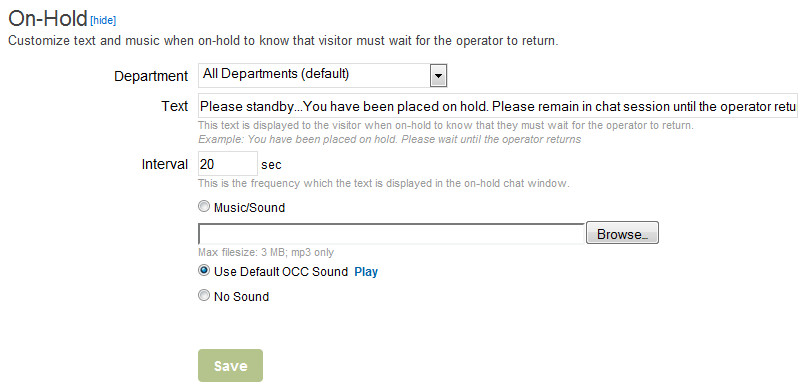
Chat On Hold Feature Section
We hope you find the improvements useful and would love to hear your feedback on the new feature!
We’ve now added all the languages our services have been translated to to our new web agent. We’ve added some new feature titles and changed the structure of our menus, so there are still some words appearing only in English. We’ll be updating these words shortly!
The languages we support are:
– English
– Bulgarian
– Croatian
– Dutch
– Farsi
– French
– German
– Italian
– Japanese
– Polish
– Russian
– Spanish
– Swedish
– Turkish
– Vietnamese
More to come soon, hopefully! If you want to help us translate to your language or have an update to an existing language please contact us:
We’ve uploaded some more new updates to the web agent and our servers overall today including:
1. Auto logging users out if they are already logged in another location.
2. Chat history is now saved and stored in the web agent.
3. Emailing chat transcripts now available on both the chat operator and chat visitor side.
4. Password saving and server performance improvements for low quality connections has been improved.
Use the new Web Agent here: https://www.onlinechatcenters.com/agent