Posts Tagged ‘chat history’

Number Scrambling & Chat Transcript Export

Written by: Categories: Features,News
June 1st, 2013

Here’s a quick Sunday update post:

2 new features have been released last week that we’re officially announcing today:

Number Scrambling

For the added safety and security of your chat visitors, any numbers that could be seen as credit card numbers or social security numbers are scrambled and not stored in the chat transcripts. You’ll instead see the numbers replaced by x’s in your chat transcripts:

Number Scrambling

Number Scrambling


Chat Transcript in CSV Export

The CSV export of your chat history now can, optionally, include the entire chat’s transcript. This is also available in the scheduled email.

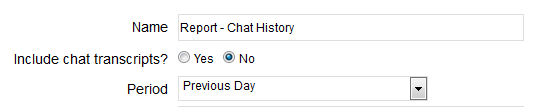
This option is only available for 30 day periods to minimize server load. Find the new option in your Account Dashboard under Reports > Chat History

Click Export to see the option appear.

Chat transcript export

Chat Transcript Export

Chat Transcript Export in Scheduled Email

Chat Transcript Export in Scheduled Email

Chat History: Rating & Ending Timestamp

Written by: Categories: Features,News
November 3rd, 2011

A couple new simple updates released today to the chat history section of the website and the OCC agents:

Chat Ending Timestamps

At the end of the chat history transcript, you’ll now see a line that displays when the chat was ended and by whom (operator or visitor):

Operator Ends Chat Timestamp

Operator Ends Chat

Timestamp Visitor Ends Chat

Visitor Ends Chat

Operator Rating

At the end of chats, you may also notice the rating the visitor gave to the operator in the post-chat rating is now available. Coming soon will be a column to sort by highest/lowest rated chats and an inclusion of this in the CSV export.

Live Chat Operator Rating

Operator Rating Left by Visitor


We hope you find the additional information added to the chat history useful and look forward to even more useful data about your chats and visitors coming soon!

Chat History – Archiving Limit & Page Navigation

Written by: Categories: Features,News
June 10th, 2011

The chat history section of the administration section has been updated with 2 highly requested additions: removal of the archiving limit and page navigation.

Chat Arching Limit Removal

Premium Version accounts no longer have a chat archiving limit of 365 days (the default is 30 days). Chats are now automatically stored forever for our OCC accounts.

Free Accounts still have a 30 day chat archive limit.

Page Navigation

To accommodate for the additional chat history storage, we added page navigation to the Chat History sections.

Page Navigation in OCC Chat History

Page Navigation in OCC Chat History

Upcoming Features

We have many features still in development, beginning with the Chat History and Operator Stats Reports and beyond. Some features being added to these reports:

All reports – filtering for common and custom-defined date ranges

Operator Stats – addition of time in chats, status times and more for each operator.


Stay updated on these developments and more via our Twitter, Facebook and this blog.


OCC Agent Updates: Chat Tab Names, End Chat Message, Email Chat Transcript

Written by: Categories: Features,News
June 1st, 2011

Today we released an update to all of our OCC Agents which includes the following updates:

Chat Tab Names

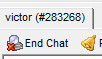
Chat tabs now contain the name of the visitor as well as the unique ID of the chat visitor.

chat tab names

Chat Tab - Names

End Chat Messages

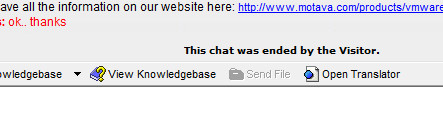
The message displayed at the end of a chat are now more descriptive, showing whether it was the visitor or the operator who ended the chat.
Screenshots of the ended chat messages seen below:

OCC live chat ended by visitor message

Chat ended by Visitor

OCC live chat ended by Operator

Chat ended by Operator

Email Chat Transcript from Chat History

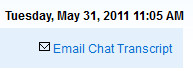
You now have the ability to email the entire chat transcript from individual chats found in your chat history. This is available through all the OCC Agents and the Chat History section in the administration section. The screenshot below is from the administration section.

Email Chat Transcript from Chat History

Email Chat Transcript from Chat History


Some other minor edits were also included:

– Columns in the Agents were changed – Current Page was added to display the current page the visitor is browsing.
– Messages displayed for users joining and leaving chat conferences were added.
– Messages displayed for chats being forwarded changed.

Download / Access the latest OCC Agents:

OCC for Windows
OCC for Mac
Web Agent


Chats Sections: Redesigned

Written by: Categories: Features,News
June 30th, 2010

One of the most important features of a live chat system is being able to look at your chat history and respond to offline and missed chat requests.

We’ve been redeveloping these sections of the administration section and both the web and desktop chat agents to be more user friendly and efficient to use.

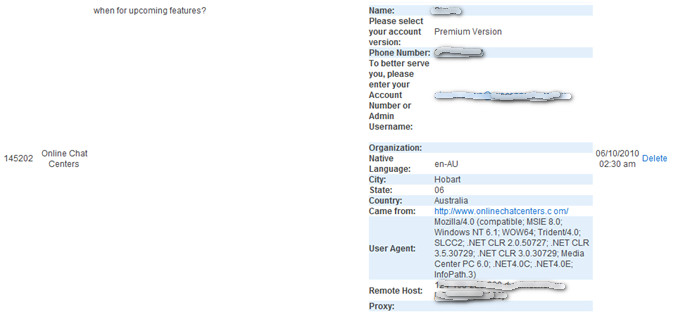
Before – Missed Chat Request

Our old layout in the administration section lacked definition between chat requests, lacked functionality in contacting visitors and displayed information in an inefficient manner, putting too much focus on the visitor’s information rather than the topic/question they asked.

Missed Chat - Old Design

Missed Chat - Old Design


After – Missed Requests, Offline Messages and Chat History

The old menu lacked other essentials – mainly, the ability to email chat request visitors and the offline messages were not viewable at all. Although accessible through the chat agents and sent via email, a central location for all missed requests in the dashboard was needed.

The redesign of this section can be seen below:

Offline Message - After Redesign

Offline Message - After Redesign


The chat request information was all neatly condensed for easy browsing, with all 3 sections listed in a similar fashion. The request information is no longer so large, showing only critical information about the chat request with the full information regarding the visitor accessible by clicking the “View All Request Information” link.

In addition, we’ve listed 3 actions to take with the request – email the visitor, mark the request as processed and delete it completely from your history.

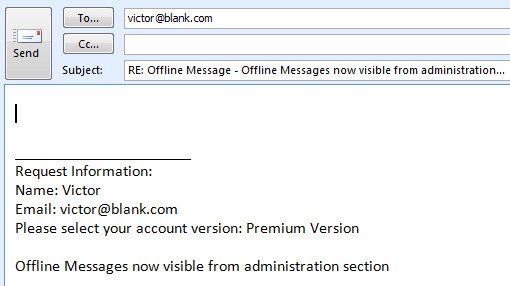
Emailing the visitor will automatically populate the message with all the request information in your default mail client software:

Automatically populated Email from Chats Section

Automatically populated Email from Chats Section

We’ve also added a new filtering option for our users with multiple departments or websites and search functionality within the Offline Message and Missed Requests section:

Search Filters within Offline & Missed Requests

Search Filters within Offline & Missed Requests

All the design changes have also been implemented in the web and desktop chat agents, easily accessible from whatever location you are monitoring your site from!

New Features & Updates Web Agent: Auto Logout, Chat History, Email Transcript, Password & Performance

Written by: Categories: Features,News
February 8th, 2010

We’ve uploaded some more new updates to the web agent and our servers overall today including:

1. Auto logging users out if they are already logged in another location.

2. Chat history is now saved and stored in the web agent.

3. Emailing chat transcripts now available on both the chat operator and chat visitor side.

4. Password saving and server performance improvements for low quality connections has been improved.

Use the new Web Agent here: https://www.onlinechatcenters.com/agent